
Digital dentistry is constantly evolving, and at the epicenter of this revolution is Exocad. With each new version, this powerful dental CAD/CAM software redefines the limits of what is possible, optimizing workflows and raising the quality of restorations. The latest great leap is the launch of Exocad 3.3 Chemnitz, an update loaded with artificial intelligence and substantial improvements that promises to transform the way dental laboratories and clinics design and produce prosthetics.
At Prodecad, as a digital laboratory and academy specializing in Exocad, we have thoroughly analyzed each of the new features of Exocad Chemnitz. In this article, we will break down the most impactful features, from multi-unit design with AI to the revolutionary workflow for split prosthetics, so you can understand why this version is, without a doubt, the smartest to date.
 Master the New Features: Join the Prodecad Academy
What is Exocad 3.3 Chemnitz? Launch Summary
Exocad 3.3 Chemnitz, also known as DentalCAD 3.3 Chemnitz, is the most recent update of the market-leading dental design software. Presented as the "smartest" version of Exocad, its development has focused on three fundamental pillars: automation through artificial intelligence, improved efficiency in complex workflows, and the expansion of the capabilities of existing modules.
This version is not a simple incremental update; it represents a significant advance in the integration of AI technologies to simplify tasks that previously required considerable manual intervention, reducing clicks and, most importantly, saving valuable time for dental technicians.
Release date and main objectives of the update
The official launch of Exocad 3.3 Chemnitz was announced on October 27, 2025 (Source: exocad launches DentalCAD 3.3 Chemnitz). The key objectives of this update, according to the official information, are clear and ambitious:
- Enhance the Implant Module: Offer a substantial update for the design of abutments and implant-supported structures, making it faster and more intuitive.
- Introduce the Split Denture Workflow: Create a new guided workflow for the design of bars and superstructures (split denture), especially for All-on-X cases.
- Expand Artificial Intelligence: Bring AI-assisted design to multi-unit restorations, automating anatomical proposals for bridges and adjacent crowns.
- Improve Visualization: Offer more realistic rendering tools for better communication with the patient and the clinician.
Main New Features in DentalCAD 3.3
The heart of this update lies in the new functionalities of DentalCAD. These improvements are designed to directly impact the daily productivity of the laboratory, combining intelligent automation with greater control for the designer.
Multi-Unit Design with Artificial Intelligence (AI Design)
One of the most anticipated features is the expansion of the Exocad's AI Design. If in previous versions the AI already surprised us with proposals for single crowns, Exocad 3.3 Chemnitz takes this capability to the next level. Now, the software can generate automatic anatomical proposals for more complex cases.
According to the official documentation (Source: DentalCAD 3.3 Chemnitz – Exocad), this feature saves time and clicks on:
- Up to three adjacent posterior crowns.
- Posterior bridges of up to three units.
The system analyzes the surrounding anatomy, antagonists, and margins to propose a coherent and functional tooth morphology in seconds. Although the AI provides an excellent foundation, the technician always maintains final control to make the necessary fine adjustments, combining the best of automation and human expertise. It is important to note that this functionality is available in selected markets.
Key Improvements in the Implant Module
The Exocad Implant Module receives one of the most significant updates in Chemnitz. The workflow for designing custom abutments and screw-retained crowns has been redesigned to be more efficient and flexible.
Key improvements include (Source: DentalCAD 3.3 Chemnitz – Exocad, Lançamento do exocad DentalCAD 3.3 Chemnitz):
- Better abutment proposals: The software now generates custom abutment proposals automatically optimized for the specific tooth position, which drastically reduces the initial design time.
- Simplified editing and customization: The tools for modifying the abutment shape are more intuitive, allowing for quick and precise adjustments.
- Saving abutment presets: It is now possible to save custom abutment shapes as presets to reuse them in future cases, standardizing production and saving time.
- 3D preview of components: The implant library now shows a 3D preview of each component, making it easier to select the correct analogs, titanium bases, and screws.
Friedemann Stang, Exocad support supervisor, highlights that the «Detect implant position» and «Abutment design» stages are the ones that have received the biggest improvements, making the process faster and more efficient without altering the main workflow that users are already accustomed to (Source: Lançamento do exocad DentalCAD 3.3 Chemnitz).
New Workflow for Split Dentures (Split Denture)
Perhaps the most disruptive new feature of Exocad 3.3 Chemnitz is the new workflow for split denture (Split Denture). This feature, integrated into the Bar Module and PartialCAD, is designed to revolutionize the design of All-on-X type hybrid prostheses.
This guided workflow allows users to design both the implant-supported bar and the prosthetic superstructure in a single integrated process. The software takes care of splitting the design into two components that fit with micrometric precision, minimizing the need for subsequent manual adjustments (Source: DentalCAD 3.3 Chemnitz – Exocad). This reduces the complexity of old workflows that often required the use of software from different providers.
Advanced Visualization with TruSmile Photo and Video
Communication with the patient is key. Therefore, Chemnitz introduces drastic improvements in realistic visualization. Based on the Exocad presentation video (Source: What’s new in DentalCAD 3.3 Chemnitz? Highlights & AI…), two new tools have been added:
- TruSmile Photo (09:05): An evolution of the TruSmile technology that allows for generating photorealistic renders of the proposed restoration, ideal for case presentations.
- TruSmile Video (09:27): It goes a step further, allowing the creation of short video clips that show the restoration from different angles, with dynamic shines and reflections. This provides an incredibly realistic preview of the final result.
New Inspira Tooth Libraries
Dental aesthetics largely depend on the quality of the anatomy used. DentalCAD 3.3 Chemnitz introduces the new «Inspira» tooth libraries (Source: What’s new in DentalCAD 3.3 Chemnitz? Highlights & AI…). These new collections offer modern and aesthetic dental morphologies, expanding the dental technician's creative arsenal.
Having high-quality libraries is essential to reduce design time and improve the final aesthetics. A good base anatomy requires fewer modifications, allowing designers to focus on fine details and customization.
 Optimize Your Designs with Premium Anatomies
Updates in other modules: PartialCAD and more
The new features are not limited to DentalCAD. The module for designing removable partial dentures, PartialCAD 3.3, also receives a major update, especially in synergy with the new split denture workflow.
Automated design of superstructures
As mentioned, PartialCAD 3.3 Chemnitz plays a crucial role in the new split prosthesis workflow. It allows designing a superstructure on implants in DentalCAD and then, with just a few clicks in PartialCAD, generating the underlying bar with a perfect fit (Source: PartialCAD 3.3 Chemnitz – exocad). This process is highly automated and is ideal for laboratories looking to standardize the production of hybrids and increase their productivity.
Other improvements in this module include:
- Flatter bar surfaces: The top surface of the bar can be configured to be perfectly flat, ensuring a superior fit of the denture.
- Improved post tool: It allows subtracting material from multiple parts simultaneously when adding posts, offering more control and reducing repetitive steps.
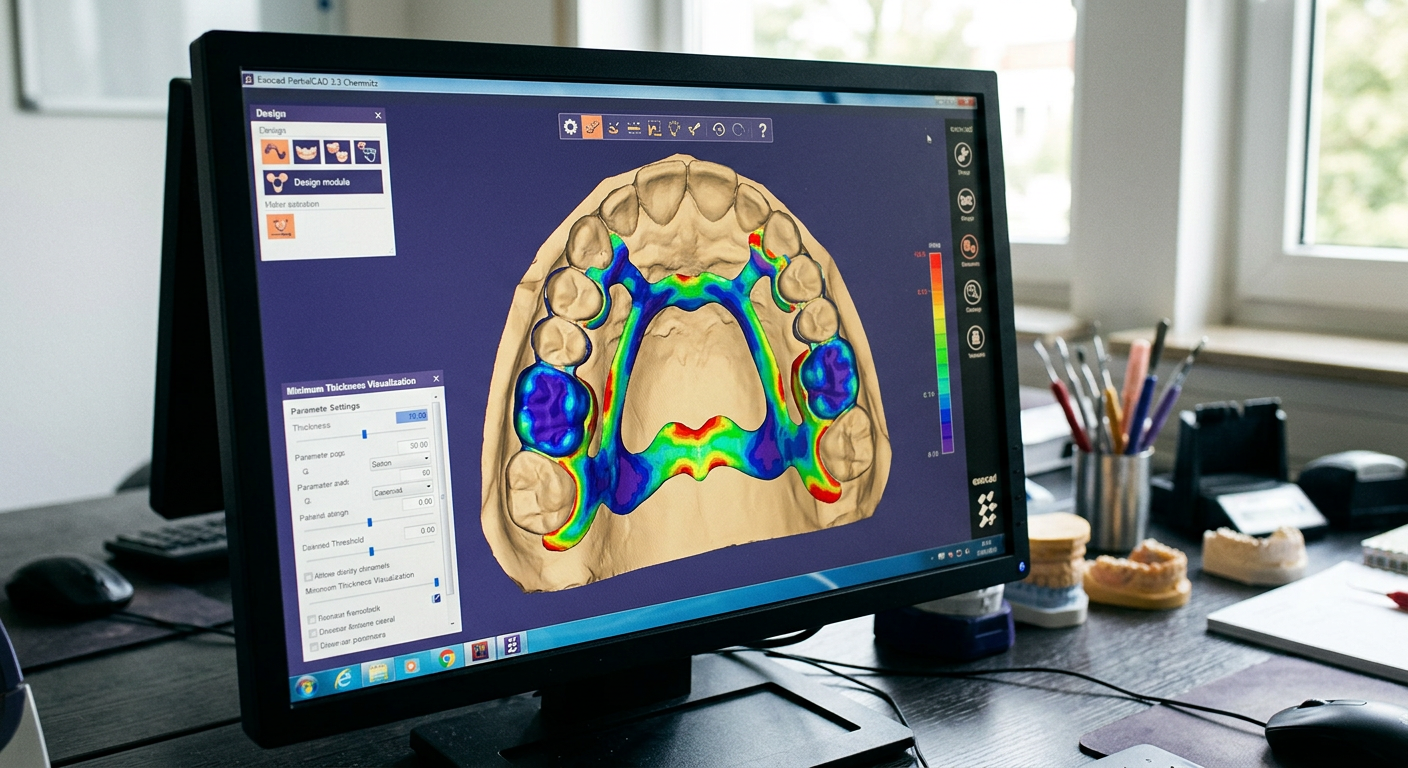
Minimum thickness visualization tools
To ensure the mechanical strength of restorations, especially in the artificial gingiva areas, PartialCAD 3.3 introduces advanced visualization tools. The software can now automatically detect areas that are too thin and add material to meet minimum thickness requirements (Source: PartialCAD 3.3 Chemnitz – exocad). This automation saves manual review time and gives the technician confidence in the durability of the final design.
Comparison: Exocad Chemnitz vs. Previous Versions
Many users wonder if the jump from versions like Rijeka or Elefsina justifies the upgrade. The short answer is a resounding yes, especially for laboratories focused on implantology and efficiency.
What key improvements does it offer over Rijeka?
Although the sources do not offer a direct comparison table, the improvements of Exocad 3.3 Chemnitz over previous versions like Rijeka are evident and focus on intelligence and automation:
- Multi-Unit Artificial Intelligence: Rijeka did not have the AI design capability for bridges or multiple adjacent crowns. This represents a massive time saving in the initial design of posterior cases.
- Split Prosthesis Workflow: This is a completely new workflow. Previously, designing a two-piece hybrid required complex manual processes, exports and imports, or the use of third-party software. Chemnitz integrates it all into a guided and precise process.
- Implant Module Revamp: The improvements in abutment proposals, the editing and saving of presets go far beyond the capabilities of previous versions, drastically streamlining one of the most common workflows in the digital laboratory.
- Superior Visualization: The TruSmile Photo and Video tools offer a level of realism that was not present in Rijeka, improving case acceptance by patients.
Is it worth upgrading?
The decision to upgrade depends on the needs of each laboratory, but the benefits in efficiency are undeniable. If your laboratory frequently works on implant cases, posterior bridges, or All-on-X hybrid prostheses, the investment in upgrading to Exocad 3.3 Chemnitz it will quickly pay for itself thanks to the time savings and the reduction in the need for manual adjustments.
Intelligent automation does not seek to replace the technician, but to empower them, allowing them to dedicate more time to customization and the aesthetic details that make a difference. From the point of view of productivity and the ability to tackle complex cases more easily, the upgrade is highly recommended.
 Learn to Get the Most Out of Chemnitz with Prodecad
Prices and How to Upgrade to Exocad 3.3 Chemnitz
One of the most common questions relates to the cost and the upgrade process. Exocad's policy remains consistent with previous releases, favoring users with active upgrade contracts.
Available license models
Exocad mainly offers two license models (Source: PartialCAD 3.3 Chemnitz – exocad):
- Perpetual License: You buy the software once and it's yours forever. To access new versions like Chemnitz, you need to have an active optional upgrade contract.
- Flex License (Subscription): You pay a recurring fee (annual, for example) that gives you access to the software and to all updates released during that period.
According to the official information, the new version Exocad 3.3 Chemnitz is available at no additional cost for all Exocad customers with a valid upgrade contract. Those with a perpetual license without an upgrade contract will need to purchase one to be able to install and use the new version.
Steps to contact a reseller
Exocad operates through a global network of authorized resellers. To update your software or inquire about specific pricing, you must contact your local reseller. They will provide you with a quote for the upgrade contract if you do not have one, and will guide you through the technical process of installing the new version.
Frequently Asked Questions (FAQ)
We answer some of the most common questions about the new Exocad Chemnitz release.
What are the system requirements?
The official release sources provided do not detail the specific technical hardware requirements (CPU, RAM, graphics card) to run Exocad 3.3 Chemnitz. Given the increase in AI and visualization features, powerful hardware is likely to be recommended. To obtain the most accurate and up-to-date information, it is essential to consult directly with your official Exocad reseller, who can provide you with the recommended specifications for optimal performance.
Do the new features require additional licenses?
Yes, some of the more advanced features are linked to specific modules that must be purchased separately. For example:
- The new workflow of split prosthesis requires having the licenses for PartialCAD, the Implant Module and the Bar Module (Source: PartialCAD 3.3 Chemnitz – exocad).
- Implant design functions, such as custom abutments, require the Implant Module.
- Additionally, Exocad has introduced an «exocad Credits» system to access certain AI-enabled services, although the specific details of which functions will require them will be clarified (Source: Press releases and publications – Exocad).
Where can I find training or tutorials?
To learn how to use all these new and powerful tools, there are several ways. The official Exocad YouTube channel (Source: exocad GmbH – YouTube) usually publishes presentation videos and tutorials on the new features. However, for in-depth, structured training in Spanish that allows you not only to know the function but to master it and apply it efficiently in your real cases, the best option is a specialized academy.
In Prodecad Dental Academy, we offer courses and continuous training on Exocad, including all the what's new in Exocad 3.3 Chemnitz. Our experts guide you step-by-step so you can integrate these tools into your digital workflow and get the most out of them from day one.
In conclusion, Exocad 3.3 Chemnitz is not just an update, it is a statement of intent. The commitment to artificial intelligence and the optimization of complex workflows consolidates Exocad as the software of choice for dental laboratories seeking efficiency, precision, and cutting-edge aesthetic results. Adapting to these new tools is key to staying competitive in the digital dentistry sector