The first Online Community for Exocad Courses
These are Prodecad Academy's online Exocad courses. We are professionals who openly demonstrate our level of experience in aesthetics and complex cases on social media.
With us, you will not only learn all the exocad modules, but you will also become a professional in digital aesthetics by designing all kinds of complex cases.
We have been working in the digital sector for more than 15 years and have trainers like Giovanni Natile with more than 45 years of experience in the sector.
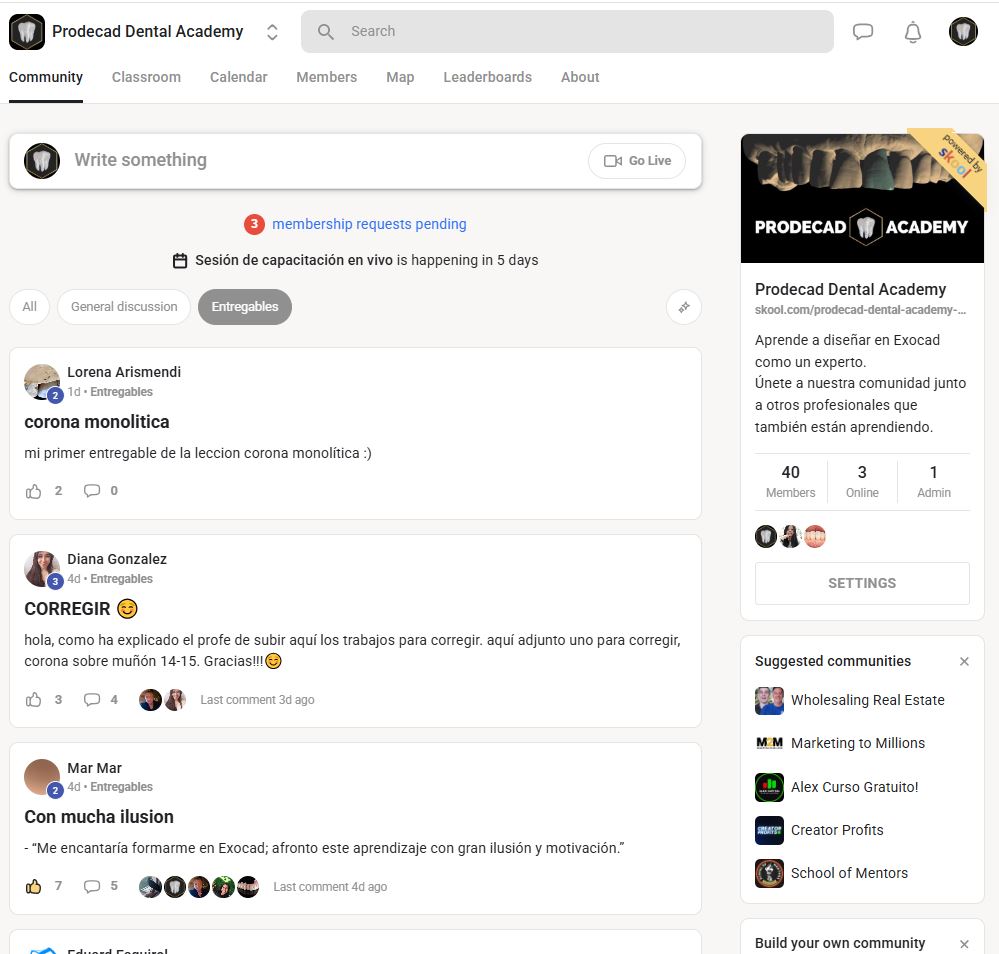
In these online exocad courses you will ...
Five steps that are covered in order and without a deadline: from the first day opening the software to the Tuesday when you correct your own case live.
Understand exocad from scratch without having any kind of experience with the software
Learn skills and shortcuts that will make you move fluently in exocad
Understand the correct digital protocols so that cases never fail
Master all the Exocad modules, from the simplest to the most complicated
Practice with us every Tuesday the cases you can't manage to solve until you become an expert
The path our students follow
The sixteen courses are ordered. You don't need to choose: you advance by blocks, and each one builds on the previous one.
Basics
Interface, odontogram, scanning types, controls and shortcuts. You start here even if you've never opened the software.
Design
From individual crown to total rehabilitation, metal framework and removable prosthesis.
Anatomy and protocols
Tooth by tooth, from 18 to 31. It's the part that separates a correct design from an aesthetic one.
Free modeling
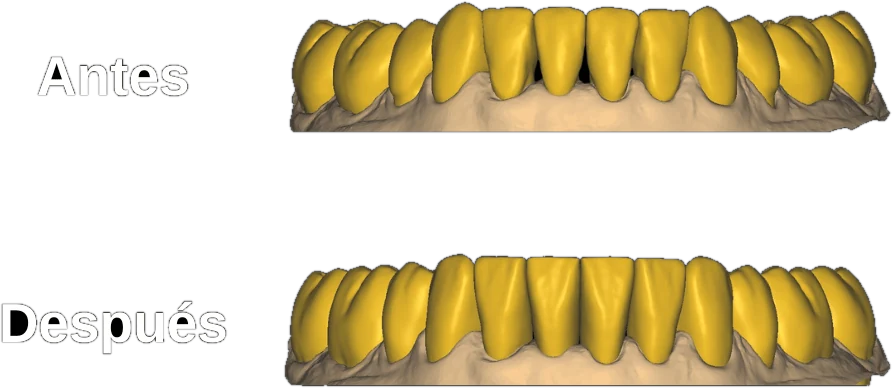
Sculpture and free modeling for what exocad doesn't solve. Taught by Patricia Ribera, accredited instructor of Blender for Dental.
Clients
Portfolio, client acquisition, rates, and the first 30 days as an exocad designer.
Esa ruta empieza el mismo día que entras: está todo grabado.
Why does Prodecad Academy have the best online Exocad courses?
Unlimited online exocad courses
At prodecad Academy you will learn all the exocad modules online for the same price.
While other courses focus only on charging you for each module they teach, here there is no limit to your learning and you can train in all the modules the software has.
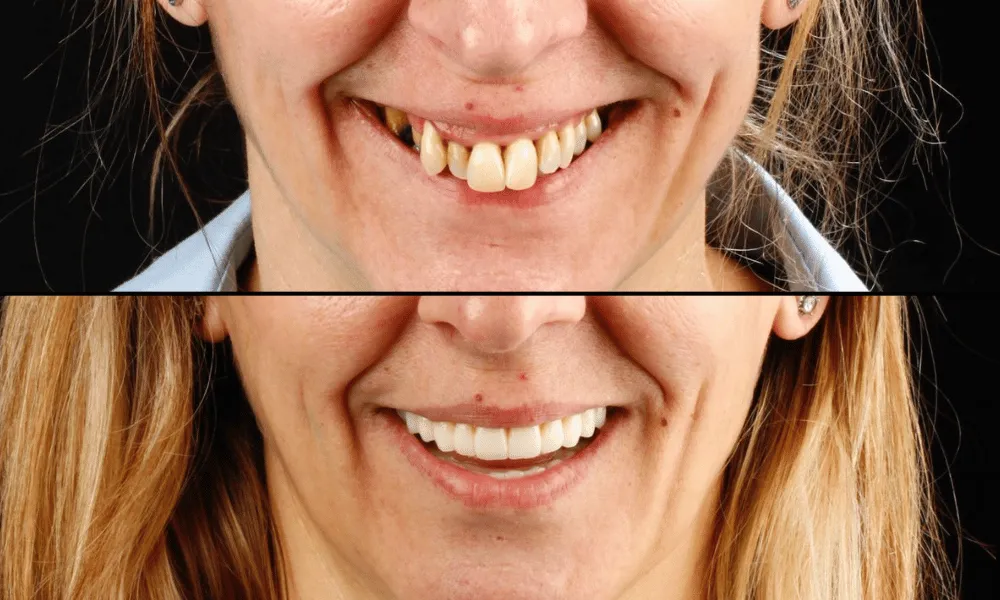
Become a professional in aesthetics
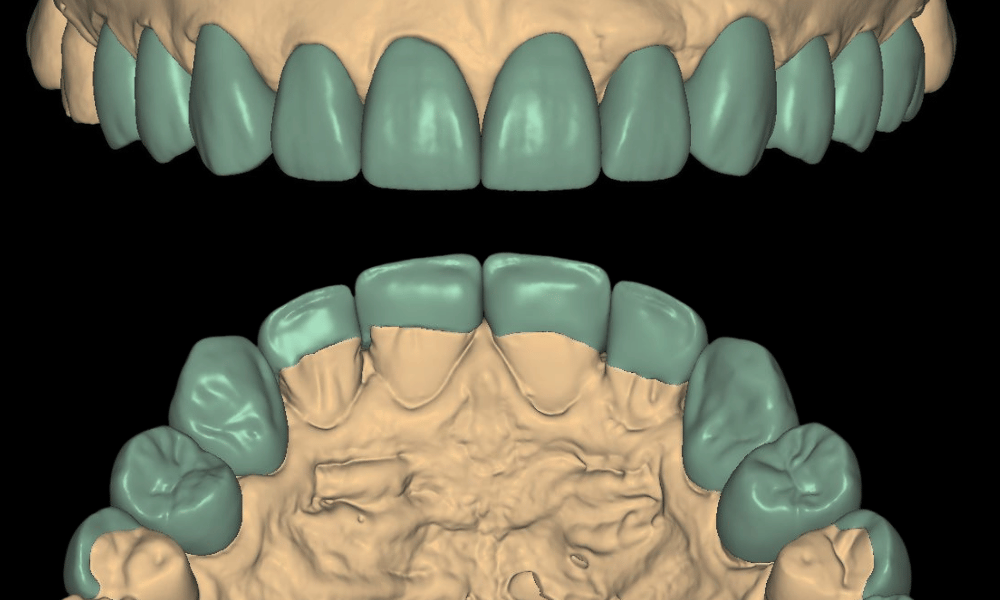
Learning the exocad modules and practicing with show cases doesn't mean you know how to design high-aesthetic restorations.
At prodecad academy you don't just get online exocad courses, we also teach you to become an expert in dental anatomy and aesthetics.
Live correction courses
Being part of the community has its advantages, every Tuesday at 19:00 Spain time we correct the cases our students send us live.
This helps them identify common errors and perfect their technique until they become professionals like us.

You don't have a specific date
In other online exocad courses, you have to worry about being able to attend on that specific day, not with us.
We have all the modules recorded so you can watch them without rushing and at the pace that suits you best.
How many online exocad courses will I receive if I join Prodecad Academy?
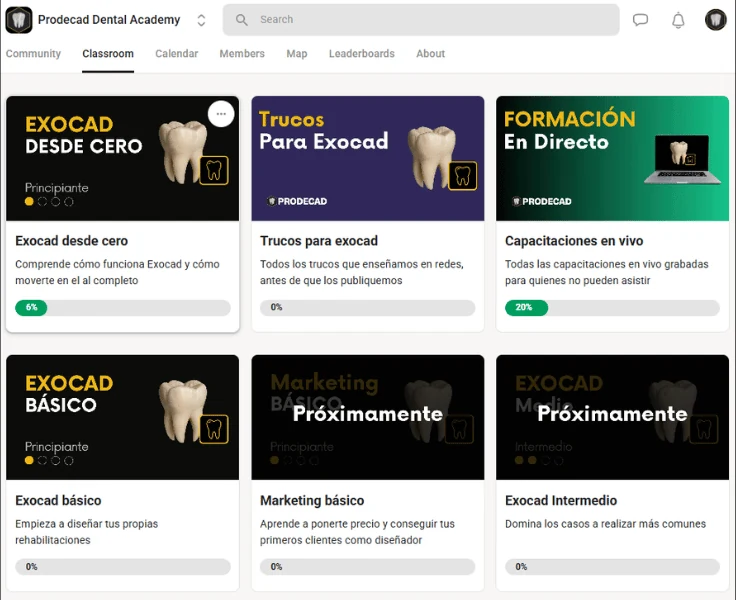
Joining Prodecad Academy gives you access to all courses and modules of Exocad. In total more than 150 recorded lessons divided into different types of courses and modules, from the most basic to the most advanced.
You will also have access to unlimited courses every Tuesday at 19:00 (Spain Time) in which we identify errors in our students' cases live:
Exocad Course from scratch5 modules, 18 lessons
- Our story
- What you will learn in the training
- The importance of deliverables
- The importance of not learning everything at once
- Deliverable
- Add doctors and designers to the record
- How the Odontogram works
- Predefined parameters for each doctor
- Physical model vs. intraoral scan
- Most used 3D file types
- Differences between 3D formats
- Stump rehabilitations
- Implant rehabilitations
- Plan a night guard
- Basic settings
- Main software controls
- Shortcuts for faster designing
- Obtain your private certificate
Basic Exocad Course5 modules, 23 lessons
- Digitally occlude scanned models
- DentalCadApp parameters
- Install a tooth library
- Install an implant library
- Install an analog library
- Adjustment of contacts and occlusion
- Monolithic individual crown
- Anatomic coping design
- Coping design
- Practical cases and deliverables
- How to choose the correct implant
- Gingival profile adjustment
- Monolithic individual crown
- Anatomic coping design
- Practical cases and deliverables
- Inlays (Inlays)
- Onlays
- Overlays
- Individual veneers
- Practical cases and deliverables
- Normal models
- Model with Geller-type die
- Model with analog and removable gingiva
Intermediate Exocad Course4 modules, 17 lessons
- Cut-back Reduction Design
- Pressed crown
- Three-unit bridges
- Bridges with pontics
- Eggshell provisional
- Reduced bridge
- Diagnostic Wax-up (Mock-Up)
- Bridges with pontics
- Bridge with cut-back reduction
- Bridge with total reduction
- Custom abutments
- What it is and how it works
- Articulator configuration
- Dynamic contacts analysis
- Normal splint design
- Splint with space filling
- Splint with library tooth
Advanced Exocad Course4 modules, 20 lessons
- Plan complete rehabilitation
- Full arch on abutment
- Full arch on implants
- Full arch with gingiva
- Hybrid with Thimble reduction
- Minimum thickness control
- Post-try-in occlusion change
- Reinforcement bar creation
- Adapt bar to cemented hybrid
- Full arch for ceramic restoration
- Skeletal framework design
- Snap-on design
- Removable denture
- Hybrid bar with friction coping
- Design of a primary telescopic crown
- Design of a secondary telescopic crown
- Implementation of attachments
- Copy of anatomical wax-up
- Copy of reduced wax-up
- Copy of full rehabilitation
Exocad Expert Course3 modules, 12 lessons
- Change background logo
- Angulate any type of implant
- Immediate loading
- Bimaxillary arch design
- Bimaxillary occlusion adjustment
- Bimaxillary with Thimble reduction
- Articulate a case without a bite
- Adapt two crowns to an abutment
- Adapt two abutments to a crown
- Split splinted bridge
- Add an extra element
- Merge any .stl file
Digital Anatomy Course6 modules, 16 lessons
- Molar 18
- Molar 17
- Molar 16
- Premolar 15
- Premolar 14
- Canine 13
- Lateral 12
- Central 11
- Molar 38
- Molar 37
- Molar 36
- Premolar 35
- Premolar 34
- Canine 33
- Lateral 32
- Central 31
Physical-Digital Protocols Course1 module, 3 lessons
- Soft tissue protocol
- Immediate loading protocol
- Full denture protocol
Blender for Dental Course3 modules, 11 lessons
- Course presentation and command guide for Blender for Dental
- Installation of Blender and Blender for Dental
- Common mesh errors
- iBar: bar on straight implants
- iBar: bar on angled implants
- iBridge: bridge on abutments
- Retentions in the bar and including the metal hole
- Meshmixer: scaling the bar to the ZR shrinkage coefficient
- iBar with metal extension
- The two ways to include the implant hole in the bar
- iBridge with attachments
Tricks for Exocad23 lessons
- Cleaning intraorals
- Collapse correction
- Error in adaptation
- Error in implant channel
- Importing a pre-operative
- Subgingival margins
- Edge in inlays
- Activate/deactivate grid
- Wax-ups without cuts
- Replacing a tooth
- Background colors
- Closing embrasures well
- Screw protection
- Dividing a bridge
- Model base
- Parallelism in dies
- Tooth extraction
- Hollowing a model
- Cervical parameters
- Remove screw channel
- Mirror copy
- Clean cut in meshes
- Modeling connectors
Artificial Intelligence in dentistry1 lesson
- AI class + full mouth rehabilitations
Practice cases1 lesson
- 1st batch of 50 cases
Live trainings42 live sessions, recorded
- 10 recorded sessions, from 24-10-2025 to 26-12-2025
- 32 recorded sessions, from 09-01-2026 to 25-08-2026
Basic Marketing Course5 modules, 20 lessons
- Why do you need a personal brand?
- Defining your value proposition
- Building credibility and trust
- Positioning in the dental sector
- The ideal portfolio of a designer
- Tools for your portfolio
- Practical cases and deliverables
- Social media
- Communities
- Direct offline contact
- Practical cases and deliverables
- Setting design fees
- Negotiation strategies
- Closing the deal
- Practical cases and deliverables
- Preparation (days 1-7)
- Execution (days 8-21)
- Evaluation and adjustment (days 22-30)
- Practical cases and deliverables
Intermediate Marketing Course4 modules, 16 lessons
- Where to show your work
- Creating your presence on social media
- How to plan your posts
- Content that builds trust
- Common errors
- Create a simple visual identity
- Examples of visual identities
- Consistent presence everywhere
- Practical case: improve your current profile
- Respond to messages and inquiries
- Clear and natural messages
- What to say (and what not to say)
- Offer your help without selling
- What work you should show
- How to use testimonials and results
- Build trust when you're new
Advanced Marketing Course3 modules, 11 lessons
- How the algorithm thinks
- How many posts to publish
- What you should never do
- Your first 5,000 followers
- Describe your services in one sentence
- How to structure your rates
- Make your offer sound attractive
- Signs that they want to work with you
- How to answer objections
- How to negotiate without lowering your value
- What to do after closing the deal
Expert Marketing Course3 modules, 11 lessons
- What to do when delivering a job
- Maintain contact without being insistent
- How to ask for feedback to improve
- How to offer benefits
- How to ask for reviews without discomfort
- Who to ask for a recommendation
- Detect recommendation opportunities
- What makes you stand out in the sector
- Convey seriousness and closeness
- Mistakes that destroy your reputation
- How to react to criticism
Todo el temario está dentro desde el primer día, sin módulos de pago aparte.
Blender for Dental, included and with Patricia Ribera
When the case requires a bar on implants, an internal reinforcement, or a hybrid with attachments, the work is finished in Blender for Dental, and that course is also included in the training.
Patricia Ribera
Dental prosthetist with more than seventeen years of bench experience, co-founder of HER 3Dental Lab and official trainer for Blender for Dental. She has trained more than 750 professionals in the sector and does not work for us: we brought her because she knows about bars.
Her course starts with installation and ends with the most challenging structures: iBar bars on straight and angled implants, iBridge bridges on abutments and with attachments, metal extensions, retentions, the screw hole, and scaling the bar to the zirconium contraction coefficient. Eleven recorded lessons and practice STLs to repeat each case on your computer.
- Official trainer for Blender for Dental
- Dental prosthetist with more than 17 years
- More than 750 professionals trained
- Speaker at Expodental
Starts on September 15, 2026 and it remains recorded within the academy, like the rest of the courses.
Advanced training at a competitive price
Our philosophy is to be able to provide advanced technical knowledge at an affordable price for everyone.
We know that not everyone can afford to take such a specialized exocad course, we have the possibility to do it and we want to share our experience with the dental community.
What a week inside Prodecad Academy is like
It's not a list of videos: it's a cycle that repeats until you can design on your own.
You watch the module when you can
Everything is recorded. There's no start date or class to be late for: you advance at the pace allowed by the lab or clinic.
You design and submit the case
Each module ends with practical cases and their deliverable. You learn by designing, not by watching videos.
Tuesday at 19:00, live correction
You send your case and we correct it live, Spain time. That's where you see the errors you don't detect on your own.
You repeat with real cases
You have a bag of practice cases to go over the same thing until you do it without thinking, and a private certificate upon completing the first course.
Así sería tu primera semana dentro.
This community fits well with some profiles and poorly with others
Hover the mouse over each point to see the detail.
You fit if…
- You start from scratch
It starts with the interface, the odontogram, and scanning types. You don't need to have ever opened Exocad.
- You already design and have fallen short
Full rehabilitation, metal structures, removable prosthetics, and digital copies are in the advanced modules.
- You also want it to look nice
An entire digital anatomy course, tooth by tooth, to go from a correct design to an aesthetic one.
- You have cases to show
You send them and we correct them live on Tuesdays at 19:00, Spain time.
- You want to make a living from designing
Four levels of marketing to get your first clients as an Exocad designer.
You don't fit if…
- You need a classroom and a schedule
Here there is no start date or in-person class: everything is recorded and you advance at your own pace.
- You only want a single module
It is not sold in parts. You either join the entire curriculum or you don't.
- You don't plan to design your cases
Watching the videos without submitting anything is not very useful: each module ends with a deliverable.
Si te has visto en la columna de la izquierda, este es tu sitio.
What they ask us before joining
Do I need to know anything about Exocad to start?
No. The first course is «Exocad from scratch»: five modules and eighteen lessons that start with the interface, the odontogram, and scanning types. It is designed to understand Exocad without having any experience with the software.
¿Sirven estos cursos de exocad online si soy dentista?
El temario es uno solo: no hay una versión para clínica y otra para laboratorio. Entras a todo el temario o no entras.
Dentro están el articulador virtual, la férula de descarga, el encerado diagnóstico (mock-up) y los protocolos de tejidos blandos, de carga inmediata y de prótesis total, además de anatomía digital diente a diente, del 18 al 31. Y hay un bloque de márketing para tu laboratorio o clínica. Si diseñas tú los casos de tu clínica, ese es el contenido que vas a usar.
Do I have to connect on a specific day?
No. All modules are recorded and you watch them at your own pace. The only things that happen live are Tuesday's corrections at 19:00, Spain time, and they are optional.
¿Estos cursos de exocad online tienen alguna clase presencial?
No. Aquí no hay fecha de inicio ni clase presencial. Todos los módulos están grabados, y estos cursos de exocad online se siguen desde tu ordenador, al ritmo que te deje el laboratorio o la clínica.
Lo más parecido a una clase es la corrección de casos: cada martes a las 19:00, hora de España. Mandas tu caso y lo corregimos en vivo, y todas quedan grabadas.
Is each module paid for?
No. You learn all Exocad modules for the same price. While other courses charge for each module they teach, here you have no learning limit.
¿Hay cursos de exocad online gratis?
Sí, hay uno: el Curso Gratuito de Exocad + IA, que está en otra página nuestra. Se ve dejando tu nombre y tu correo, sin pagar nada.
La academia es otra cosa: ahí están los cursos de exocad online completos, sin módulos de pago aparte. Si quieres hacerte una idea antes de decidir, tienes el temario entero en esta misma página.
How much content is there in total?
Fifteen courses, forty-five modules, and more than two hundred thirty recorded lessons, from the most basic to the most advanced.
¿Esto es un máster de exocad?
No. Esto no es un máster: al terminar el primer curso recibes un certificado privado.
Lo que hay es el temario de los cursos de exocad online ordenado por bloques —bases, diseño, anatomía y protocolos, modelado libre y clientes—, y se avanza en ese orden. Cada módulo termina con casos prácticos y su entregable, y la formación no se cierra el día que acabas el temario.
Is only the software learned?
No. In addition to the Exocad modules, there is a complete digital anatomy course, tooth by tooth, and three levels of marketing to get your first jobs as a designer.
What happens with cases that get stuck?
You send them and we correct them live. Every Tuesday we review student cases to identify common errors and perfect the technique.
¿Te queda alguna duda? Pregúntanos antes de decidir.
What do our students think?





El siguiente puedes ser tú.
A dental design center that teaches what it uses every day
The same team that designs for laboratories y clinics is the one who records the modules and corrects Tuesday's cases.
We design every day
Prodecad is a dental design center. Before being an academy, we are the team that solves cases for laboratories and clinics.
We teach the workflow we use
The modules come from that daily work, not from demonstration cases prepared for everything to go well the first time.
And we keep correcting
Every Tuesday we review student cases live. The training doesn't close the day you finish the curriculum.
Aprende de quien diseña casos reales todos los días.
Enter, watch the first module, and decide later
All the content is included from day one: the fifteen courses, the forty-five modules, and Tuesday's corrections. There's no start date to wait for.
Don't you know which course you should take first?
Four questions and we'll tell you where to start based on your level and what you want to achieve. No commitment.
`By sending you accept the` privacy policy`. We use your data only to answer you.`